
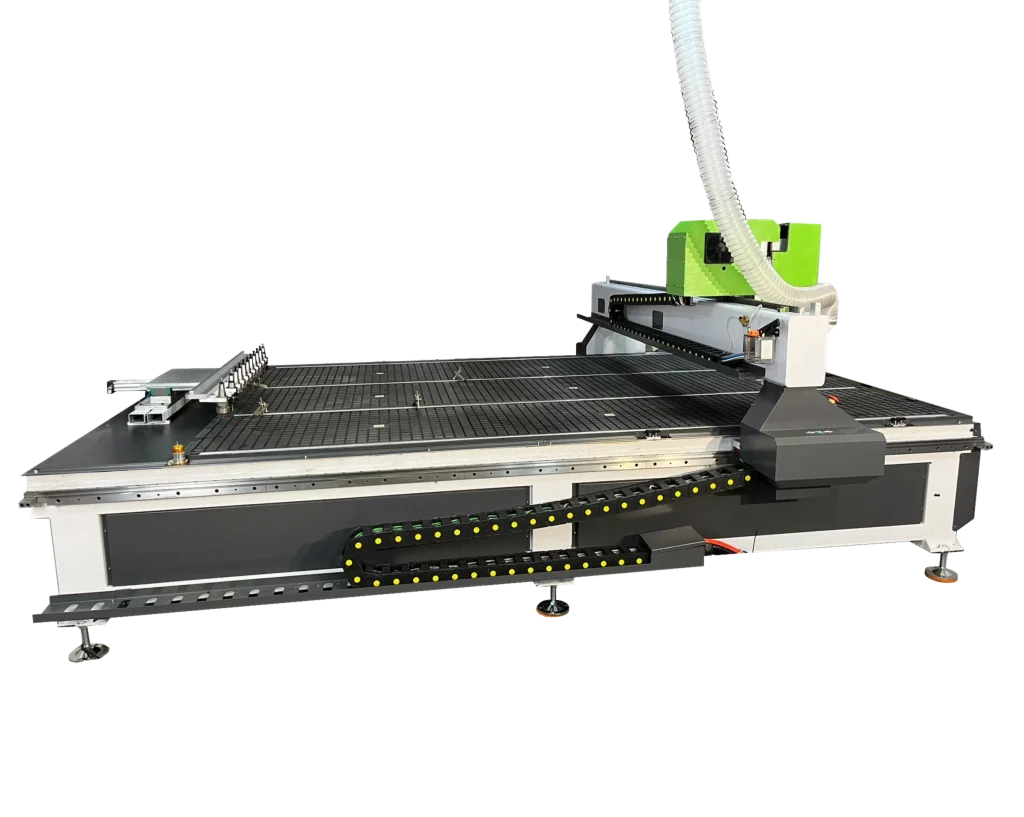
CNC programming on a gantry router for panels rarely means writing code by hand. However, every link can spoil a part: the file, CAM, postprocessor, control or drives.
The CNC definition and general drawing-to-code workflow are explained in what CNC machines are. Here we take a more practical look at what happens to a file on a CNC router, how Mach3 differs from PikoCNC, what servo drives change and how to set workpiece zero.
Machine parameters come from the specifications of Roboteus CNC routers, and software prices from manufacturer and retailer websites, as recorded in October 2026.
1. Input files: vectors for 2D, meshes for 3D
Two file types are normally used. DXF and SVG vectors describe contours: cut-outs, pockets, holes and engraving. An STL mesh describes a solid’s surface, such as a relief, mould or form cutter. PikoCNC states that its CAM generates 3D toolpaths from STL files and supports milling curved surfaces.
Check three things before importing into CAM. Contours must be closed: an open line will not define a pocket or cut-out. The scale must be millimetres. Remove duplicate lines, or the cutter will follow them twice.
2. CAM: CNC programming without writing code
CAM converts geometry into toolpaths. Panel routers repeatedly use three strategy groups:
- 2D: contour cutting outside, inside or on the line, drilling and V-bit engraving.
- 2.5D: pockets and chamfers at successive Z levels. ACRYLITE describes CNC machines supporting 2½, 3, 4 and 5-axis machining.
- 3D: roughing and ball-nose finishing over a mesh-defined surface.
For each operation, select a tool from the library, pass depth, finishing allowance and entry method. Ramp entry matters for down-cut tools; Amana considers it essential for its PCD cutters.
When cutting sheet, CAM nests the parts, leaves tabs and determines cutting order: holes and small parts first, outer contours last while the part remains attached to the sheet. Why this order and two nesting passes help retain parts is explained in CNC vacuum tables. Calculate spindle speeds and feeds with the formulas in CNC milling parameters.
CAM software prices for CNC routers, recorded in October 2026:
| Software | Source | Price |
|---|---|---|
| Vectric VCarve Desktop / VCarve Pro / Aspire | vectric.com, in PLN, VAT not specified | 1,765.12 / 3,535.32 / 10,090.05 PLN |
| Vectric Cut2D Pro | vectric.com, VAT not specified | 2,270.89 PLN |
| Vectric VCarve Pro / Aspire | retailer A, CNC routers, excluding VAT | 3,048.78 / 8,325.20 PLN |
| Autodesk Fusion | autodesk.com/pl, including VAT | 3,192 PLN annually, or 400 PLN monthly |
| UCanCAM V13 PL | retailer B, CNC routers, excluding VAT | 1,190.00 PLN, compared with 1,215.45 PLN on the product listing |
| Carveco, ArtCAM’s successor | carveco.com | $180–2700 annually |
3. Postprocessor: translating for a specific control
Autodesk describes a postprocessor as a tool that translates machining operations into a language the machine understands. It produces an NC file, usually G-code. Choose a postprocessor file matching the machine; generic postprocessors can be edited.
G-codes are described in ISO 6983-1, but controls differ in details: tool changes, comments, arcs and program starts. The same G-code need not behave identically on Mach3 and PikoCNC. Autodesk recommends taking every precaution when first running output from a new postprocessor. In practice, dry-run above the material with Z zero raised, reduced feed and a hand ready at the emergency stop.
4. Router G-code: key codes and a short example
ISO 6983-1 specifies the data format for positioning, linear motion and contouring. The meanings below follow the Poznań University of Technology teaching material:
| Code | Meaning |
|---|---|
| G00 (G0) | rapid movement without machining; the path is not always straight |
| G01 (G1) | linear interpolation at feed rate F |
| G02 / G03 | clockwise / anticlockwise arc, using centre I, J or radius R |
| G17 | XY plane |
| G90 / G91 | absolute / incremental coordinates |
| G54–G59 | workpiece coordinate systems |
| M03 / M05 | clockwise spindle rotation / stop |
| M06 | tool change |
| M30 | end of program |
LinuxCNC documentation adds that G0 paths may be blended around direction changes. Safe clearance is therefore needed above fixtures and clamps.
The following is illustrative, not a program to run. Feeds, spindle speeds and coordinates are examples. It cuts a rectangular contour with one rounded corner, with Z zero on the material’s top surface. Through-cutting may instead use the spoilboard as Z zero; see section 7. The path represents the tool centre because CAM has already allowed for cutter radius.
„gcode % (illustrative example - example values) G21 G90 G17 (millimetres, absolute coordinates, XY plane) G54 (workpiece coordinate system) T1 M6 (tool 1 - automatic change with ATC) (with ATC: tool length compensation - M6 macro or code, e.g. G43 H1, depending on control) S18000 M3 (clockwise spindle rotation) G4 P2 (example dwell for spindle acceleration; P units depend on control) G0 Z10 (safe height) G0 X0 Y0 (above start point) G0 Z2 G1 X20 Z-3 F600 (ramp entry) G1 X100 F3000 (linear motion at feed rate) G1 Y50 G3 X90 Y60 I-10 J0 (anticlockwise arc) G1 X0 G1 Y0 G1 X20 (closing the ramp segment) G0 Z10 (retract above material) M5 (spindle stop) M30 (end of program) % „
On a machine without ATC, such as the RBF 1212, the tool-change line will stop the program or be ignored, depending on the postprocessor and control configuration. Example comments use ASCII characters because not every control supports special characters.
After M3, the spindle needs time to reach speed. Check whether the control has a configured delay; if not, the postprocessor should insert a G4 dwell. With ATC, depth is correct only if the control accounts for tool length. Some dialects activate compensation through the M6 macro, others through a code in the program.
The example follows the contour anticlockwise. Outside a workpiece, with clockwise spindle rotation M3, this gives conventional milling, which ACRYLITE recommends for outer edges. A clockwise path would give climb milling; for an internal contour, pocket or hole, the relationship reverses. CAM selects this by reversing contour direction.
5. CNC control: Mach3 with a motion controller or PikoCNC Ethernet
The RBF 1212 specification describes Mach3 over USB. RBF 9060 and RBF 2030V use Mach3 with an HXC Motion Control 2 MHz USB controller; RBF 2040V uses HXC 2 MHz and Mach3 USB. RBF 1325 ATC and RBF 2030 ATC use a PikoCNC Ethernet controller, LAN/USB.
Mach3’s manufacturer describes it as turning an ordinary PC into a CNC control. The older parallel-port route needs a PC with LPT and 32-bit Windows. With an external motion controller, Mach3 works with Windows versions up to 10. Demo mode has a 500-line G-code limit and locks the kernel frequency at 25 kHz, the latter only with the parallel-port driver. Manufacturer descriptions show that, with USB, the external device rather than the PC generates drive pulses.
PikoCNC includes a built-in PLC. Its manufacturer states that the program runs in the controller independently of the PC. Types P and M communicate over Ethernet, handle 5 axes and generate STEP pulses up to 300 kHz for P or 1 MHz for M. They also support a probe, MPG handwheel and Z-axis mapping.
For the operator: with Mach3, the PC forms part of the control and should be stable and free from other workloads. With PikoCNC, the program and PLC logic run in the controller, so axis motion depends less on PC activity.
| Licence or hardware | Source | Price |
|---|---|---|
| Mach3 | machsupport.com | $175, a separate commercial licence for each machine |
| Mach3 | retailer C, CNC routers | 909.76 PLN excluding VAT |
| Mach4 Hobby / Industrial | machsupport.com | $200 / $1,400 |
| UCCNC | cncdrive.com | 66 € per motion controller |
| PikoCNC Standard and Extended keys | pikocnc.com, including VAT | 100–450 PLN |
| PikoCNC type P / M controller | pikocnc.com, including VAT | 1,250 / 1,350 PLN |
6. Drives: stepper motors versus AC servos
Oriental Motor explains that a stepper moves to the commanded position and holds it, while a servo seeks the position using encoder feedback. A stepper normally works open-loop and can lose synchronisation under overload: it loses steps. The control does not know, so the remaining contour is shifted. Stepper torque falls at high speeds. A servo maintains torque better across its speed range but needs tuning and costs more.
According to Roboteus specifications, non-ATC models RBF 9060, 1212, 1325V, 2030V and 2040V use 8.5 Nm steppers, while RBF 1325 ATC and RBF 2030 ATC use 1000 W AC servos and reach working speeds of 14,000 mm/min. All model speeds and their effect on feed are compared in the milling-parameters article.
With stepper drives, lost steps often become apparent only when measuring the part. After a long program, check the position against a known point, for example the HOME reference.
7. Axes, homing and the tool-length sensor
ISO 841 describes the coordinate system of NC machines. It assumes tool movement relative to a stationary workpiece, regardless of what physically moves. According to Poznań University of Technology material, the router’s Z axis is parallel to its spindle, while X and Y lie in the table plane and form a right-handed system. Which axis is longer depends on the manufacturer: RBF specifies X × Y, for example 1300 × 2500 mm, so X is shorter there. Check axis orientation in the manual and match it in CAM.
Machine setup has three steps:
- Machine homing. At power-up, the axes move to the inductive HOME limit sensors present on every RBF router. This establishes machine zero.
- Workpiece zero. The operator sets X/Y zero at a sheet or fixture corner and stores it in G54. For through-cutting on a vacuum table, Z zero is often on the spoilboard surface. More detail is in choosing a CNC vacuum table.
- Tool length. RBF specifications list a tool-height or length sensor. The cutter touches it and the control corrects Z zero after each change. With ATC, this is essential to correct depths for every tool in the magazine; check whether the tool-change macro or a program code activates compensation. According to one woodworking machining-centre manufacturer, tool length is checked after a change and compared with the tool database.
This stage is also highlighted in CNC machine operating basics: verify the program, datum and tool before starting.
8. Common starting errors
- Wrong postprocessor. A generic postprocessor can produce arcs or tool changes interpreted differently. Dry-run the first program.
- Zero in the wrong place. Setting Z zero on top of the material in CAM but on the table at the machine means cutting into the table or machining air.
- Clamp collisions. G0 is not always straight, so safe height must clear the highest fixture.
- Plunging vertically with a down-cut. This risks fire or tool breakage. Set a ramp in CAM; manufacturer warnings are compared in types of CNC cutters.
- Demo licence. Mach3 demo reads only 500 lines; 3D paths normally contain considerably more.
Frequently asked questions
What does a postprocessor do in CNC programming?
It translates CAM paths into a specific control’s G-code dialect: tool changes, arcs, comments and program start. The file must match the machine; generic versions can be edited. Dry-run the first output from a new postprocessor.
Mach3 or PikoCNC: which should I choose?
Mach3 runs on a PC and works with a USB controller on RBF machines, for example HXC 2 MHz. PikoCNC uses an Ethernet controller with a PLC executing the program independently of the PC. Roboteus uses it on ATC machines.
Which software should I start with for a CNC router?
For 2D and 2.5D, software such as Vectric VCarve or UCanCAM is sufficient. For 3D, check the manufacturer’s comparison to establish whether the version supports modelling and 3D toolpaths. Also check that a postprocessor is available for your control.
Will the same program run on another router?
Not always. ISO 6983-1 aims to facilitate program exchange, but controls use different dialects. Regenerating code in CAM with the other machine’s postprocessor is safer.
Stepper or servo motors on a CNC router?
According to Oriental Motor, an open-loop stepper can lose steps under overload, while an encoder-equipped servo maintains position and holds torque better at high speed. RBF ATC models use AC servos and reach 14,000 mm/min. Full configuration selection is described in choosing a CNC router for wood.
Sources
- https://roboteus.com/pl/maszyny/frezarki-cnc/ — RBF range
- https://roboteus.com/pl/maszyny/frezarki-cnc/frezarka-cnc-rbf-9060/ — Mach3 / HXC 2 MHz, stepper drives
- https://roboteus.com/pl/maszyny/frezarki-cnc/frezarka-cnc-rbf-1212/ — Mach3 USB, drives and sensors
- https://roboteus.com/pl/maszyny/frezarki-cnc/frezarka-cnc-rbf-1325v/ — Mach3, tool-height sensor, HOME
- https://roboteus.com/pl/maszyny/frezarki-cnc/frezarka-cnc-rbf-1325-atc/ — PikoCNC Ethernet, AC servo 1000 W
- https://roboteus.com/pl/maszyny/frezarki-cnc/frezarka-cnc-rbf-2030v/ — Mach3 / HXC, Leadshine MA860H
- https://roboteus.com/pl/maszyny/frezarki-cnc/frezarka-cnc-rbf-2030atc/ — PikoCNC Ethernet, AC servo 1000 W, LC10P
- https://roboteus.com/pl/maszyny/frezarki-cnc/frezarka-cnc-rbf-2040v/ — HXC / Mach3, HBS86H, tool-length sensor
- https://www.iso.org/standard/34608.html — ISO 6983-1 scope
- https://www.iso.org/standard/23949.html — ISO 841 scope
- https://lmi.put.poznan.pl/wp-content/uploads/2022/10/Instrukcja-1-Obrobka-prostych-ksztaltow.pdf — axes, G- and M-codes
- https://linuxcnc.org/docs/html/gcode/g-code.html — G0 path and G54–G59 systems
- https://help.autodesk.com/cloudhelp/ENU/Fusion-CAM/files/MFG-POST-PROCESSING-OVERVIEW.htm — postprocessing
- https://www.machsupport.com/software/mach3/ — Mach3 requirements, demo and licensing
- https://www.machsupport.com/shop/mach3/ — Mach3 price, October 2026
- https://www.machsupport.com/software/mach4/ — Mach4 prices, October 2026
- https://www.cncdrive.com/UCCNC.html — UCCNC licensing, October 2026
- https://www.pikocnc.com/hardware — PikoCNC controllers, PLC and 3D CAM
- https://pikocnc.com/sklep — PikoCNC key and controller prices, October 2026
- https://blog.orientalmotor.com/the-choice-between-servo-motors-and-stepper-motors — stepper and servo motors
- https://www.acrylite.co/resources/fabrication-manuals/routing-premium-acrylite-acrylic-sheet — 2½ to 5-axis machining and outer-edge feed direction
- https://www.amanatool.com/pub/media/productattachments/PCD-Spoilboard-Speed-Chart-v3.pdf — ramp entry
- https://www.vectric.com/compare/ — Vectric prices, October 2026
- https://www.autodesk.com/pl/products/fusion-360/overview — Fusion price, October 2026
- https://carveco.com/about/ — Carveco as ArtCAM’s successor and prices, October 2026
Editorial note
Licence and software prices come from manufacturer and retailer websites as recorded in October 2026 and may change; some are in foreign currencies or do not specify VAT. The G-code is illustrative: control dialect, parameters and safe heights depend on the machine, tool and material. This article does not replace the machine and control manufacturers’ instructions or safety requirements for machine tools and wood dust.