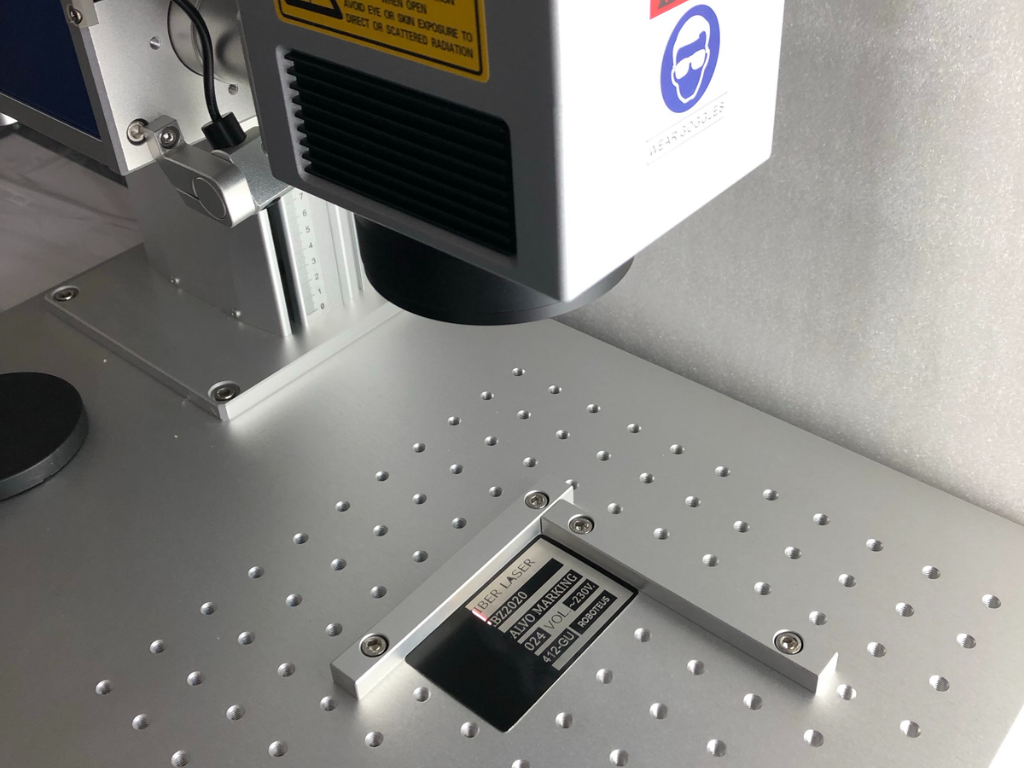
Laser markers offered by stores are almost always just product information. Each describes the same design: source, galvo head, column, and table, in several power classes and with several working fields. Stores tell you what they sell. They don’t tell you which variant suits your workpieces.
This text organizes the decision in the order in which it's worth making it: source (fiber, MOPA, or UV), power, working area, and lens, and finally, equipment. The numbers come from Roboteus product sheets, Polish online stores (we'll label them A–F, the same throughout this text; as of October 2026), and manufacturer materials.
Roboteus marking machines: the RBZ 2020 fiber marking machinehas pricing based on the process, after a trial on the customer’s material, andthe RBZ 1515UV UV marking machinehas a guide price from PLN 19,512.00 net (configuration based on the process). If you’re just considering a purchase, start with the calculation in the textLaser engraving – service or own engraving machine.
1. First the material, then the source: fiber, MOPA or UV
A laser marker consists of a laser source, a galvanometric head (two mirrors guiding the beam across the field), and an F-theta lens focusing the beam flat on the work area. The differences begin with the wavelength, as this determines what the material absorbs.
| Source | Wavelength | What it marks | What is not marked or marked poorly | Example |
|---|---|---|---|---|
| Fiber optic with Q-switch | 1064 nm | metals: steel, stainless steel, aluminum, brass, copper, titanium; ABS, polyamide, polycarbonate, PMMA | glass and transparent plastics – beam passes through; PE and PP without additives | RBZ 2020: Raycus 50W |
| MOPA (fiber with adjustable pulse) | 1064 nm | like fiber, plus colors on stainless steel and titanium, black on anodized aluminum | like fiber | shop B: source JPT M7 MOPA |
| UV | 355 nm | light and flame-retardant plastics, glass, ceramics, electronics; "cold marking" without melting | reflective metals – possible, but fiber is faster | RBZ 1515UV: JPT 5 W |
The material ranges in the table are given according to the technical materials of several manufacturers of industrial marking machines.
The fundamental difference between fiber and MOPA is pulse duration: according to one marking machine manufacturer, standard fiber has a fixed pulse duration of about 100 ns, while MOPA adjusts it within the 2–500 ns range. According to another manufacturer, MOPA also has a wider frequency range (up to 1 MHz compared to about 100 kHz in Q-switch), which produces stable colors on stainless steel and black on the anode, which the Q-switch „does not reliably achieve.” In store B’s catalog, a 30 W fiber costs PLN 15,121.95 net, while a 30 W MOPA with a JPT M7 source costs PLN 24,390.24 net (as of October 2026).
UV is a separate category, not „stronger fiber.” The RBZ 1515UV has a 5 W JPT source at 355 nm, a 150 × 150 mm field, workpiece height up to 250 mm, speed up to 7 m/s, and a declared lifetime of up to 20,000 operating hours; according to the product page, it marks a pen in less than a second. The additional charge for 5 W UV over 30 W fiber at the same store is PLN 13,333.33 net (store B) and PLN 8,869.92 net (store D).
2. Source power: power table → application
Marking power is average power. The pulse energy and power density in the spot determine what happens on the workpiece, so 5 W UV and 50 W fiber are not directly comparable. Frame of reference: according to GS1, direct marking lasers (DPM) are „commonly 10–100 W.”
| Power class | Typical tasks | What not to expect |
|---|---|---|
| Fiber 20W | serial numbers, DataMatrix and QR codes, logos on steel and aluminum; removal of the anodized layer; annealing (black without loss) on stainless steel | deep engraving in a reasonable time; large fills in long series |
| Fiber 30W | the same faster: larger fills, series, light engraving; the most common class in Polish stores | deep engraving |
| Fiber 50W | engraving with multiple passes, varnish and coating removal, plaques, brass and copper; RBZ 2020 class | — |
| Fiber 100W | deep engraving, large surfaces | — |
| MOPA 20-60 W | colors on stainless steel and titanium, black on anodized aluminum, materials with less foaming (according to marking machine manufacturer materials) | — |
| UV 3–5 W | plastics, glass, electronics, gadgets | metal at fiber speed |
Depth costs time, not just power: one laser manufacturer shows in its support materials that achieving the same depth without warping the workpiece requires several times more passes than the high-speed option—the numbers and parameters are in the text aboutlaser engraving on metal . According to another laser machine manufacturer's materials, a typical engraver is 10–50 µm. Any class from the table will perform the codes and numbers; choose power for the most demanding task performed regularly, not for one that occurs only once a quarter.
3. Working field and F-theta lens
The working field is not a feature of the machine, but of the lens. The same head with a different F-theta lens produces a different field, a different working distance, and a different spot size. The F-Theta Shop provides a typical setup:
| F-theta lens | Field of work (according to store F) | Comments |
|---|---|---|
| F100 | 75 × 75 mm | the smallest spot and the highest power density |
| F163 | 110 × 110 mm | multi-set standard |
| F210 | 150 × 150 mm | field as in RBZ 1515UV |
| F290 | 200 × 200 mm | field like in RBZ 2020 |
| F420 | 300 × 300 mm | largest spot, greatest working distance and depth of field |
The relationship is physical: a longer focal length produces a larger field but a larger spot, thus distributing the same power over a larger area. The mark is thicker, and the fill is slower or shallower. Stores declare a minimum fiber line width ranging from 10 µm (store C) through 15 µm (store D) to 50 µm (store B), depending on the lens and measurement method.
A larger field provides a greater working distance and depth of field, which forgives uneven details. The field should cover the largest detail or a whole palette of parts marked in a single setting. The RBZ 2020 has a raster table with M6 threads for a multi-piece fixture; in this case, the 200 × 200 mm field works as a series field.
The lens replacement is subject to a fee: in store B the lenses cost from PLN 1,000 net (70×70 mm) to PLN 1,626.02 net (300×300 mm), in store A from PLN 450 to PLN 600 net (as of October 2026).
4. Cooling: air or liquid
Fiber laser markers in the 20–50 W classes are air-cooled: RBZ 2020 has air cooling, 230 V single-phase power supply, 60 × 75 × 75 cm set and 50 kg. Stores declare fiber power consumption as ">500 W" (store B), 800 W (store E) and "up to 1000 W" (store D).
UV sources require a chiller: shop B lists 5W UV as "<1.8 kW" with a chiller included, shops C and D include CWUL-05 chillers. The RBZ 1515UV has a maximum consumption of 900W. In shop catalogs, almost all fiber laser markers are air-cooled; the chiller appears with UV.
A chiller requires additional storage space, distilled water, and temperature monitoring. One laser manufacturer (in a document about CO2 tubes) recommends keeping the water below 30 °C and only starting above 15 °C: water that is too cold risks condensation, and every 10 °C increase on the electronics shortens its lifespan by half—this is a general rule for semiconductors.
5. Class 1 enclosure or open position
The laser class is a characteristic of the entire device in its delivered configuration, not the source. According to the Central Institute for Labour Protection (CIOP-PIB) (PN-EN 60825-1:2014-11), Class 1 also includes fully enclosed high-power lasers; according to materials from one laser manufacturer, an unenclosed galvo head is Class 4, hazardous to eyes and skin, and poses a risk of fire. Classification is the manufacturer's responsibility; risk assessment for a Class 4 laser workstation is the employer's responsibility (Ministry of Labor and Social Policy regulation of May 27, 2010, according to CIOP-PIB).
In store B's catalog (net, as of October 2026), a closed cover increases the price of a 20 W fiber optic cable from PLN 10,569.11 to PLN 15,447.15, a 30 W fiber optic cable from PLN 15,121.95 to PLN 16,260.16, and a 50 W fiber optic cable from PLN 18,943.09 to PLN 23,000. Store A charges PLN 6,000 net more for the closed version than for the open one. A separate housing (store B: interruption of marking when door opens, filter glass) costs PLN 14,000 net.
For the open workstation, glasses are required according to PN-EN 207:2017: CIOP-PIB gives an example of a 10 W pulsed laser at 1064 nm, for which the required optical density is OD ≈ 5. The extraction system is needed regardless of the housing: BOFA extraction systems in shop B PLN 4,878–7,724 net, extraction systems in shop A PLN 3,000 and PLN 4,500 net.
6. Rotary axis, autofocus, table and software
The rotary axis (turntable) is used for marking around the circumference of sleeves, cups, and rings. Only store D includes it in the machine price (sets with axis); store E charges PLN 1,219.52 net for the rotary holder. Separate turntables cost PLN 1,067–2,439 net in stores B and C, and PLN 4,000 net in store A. In the RBZ 2020, the rotary axis is an option.
Autofocus and an electric Z-axis speed up work on workpieces of varying heights: store D prices the 50W fiber with a 300×300 mm field and autofocus at PLN 24,308.94 net; store A prices autofocus versions „from PLN 11,500.00” net. Without autofocus, focus is set using an indicator: the RBZ 2020 has a dual focus indicator (red dot) and a foot switch.
Software: RBZ 2020 runs on the EZCAD controller (vector and bitmap files via USB); RBZ 1515UV comes with EZCAD 2 included and LightBurn optional, on a Windows PC. A computer is not included in any of the reviewed stores; add it to each offer.
7. How much does a laser marker cost: list prices by power
Below are net list prices from Polish stores, as of October 2026, excluding computer and enclosure, unless otherwise noted. Most are promotional prices: a starting point, not a „market price.”
| Class | Offer | Comments | Net list price |
|---|---|---|---|
| Fiber 20W | shop A | F163 lens included | 8,000 PLN |
| Fiber 20W | shop B | economy version | 8,500 PLN |
| Fiber 30W | shop C | Raycus source, field 150×150 mm, stationary | 9,900 PLN |
| Fiber 30W | shop B | — | 15,121.95 PLN |
| Fiber 30W | shop D | field 200×200 mm, turntable included | 15,439.02 PLN |
| Fiber 50W | shop A | — | 16,000 PLN |
| Fiber 50W | shop B, two entries | — | 18,943.09–19,918.70 PLN |
| Fiber 50W | RBZ 2020 (roboteus.com) | Raycus 50 W, field 200 × 200 mm, EZCAD | valuation for the process |
| Fiber 100W | shop A / shop B | — | 30,000 PLN / 37,000 PLN |
| MOPA 30W | shop B | JPT M7 source | 24,390.24 PLN |
| UV 5W | shop C | built-in version, housing and chiller included | 19,932.64 PLN |
| UV 5W | shop A / shop B | — | 25,000 PLN / 28,455.28 PLN |
| UV 5W | RBZ 1515UV (roboteus.com) | JPT 5 W, field 150 × 150 mm, EZCAD 2 | from PLN 19,512.00 net (indicative price, configuration for the process) |
In the 30W class, the price range between stores (from PLN 9,900 to PLN 15,439.02) is greater than the jump to the 50W class with a single supplier, so price is determined by configuration, not wattage.
Shops declare source life uniformly as „100,000 h”, but one marking machine manufacturer states for its fibers „at least 25,000 h”; neither of these figures has a definition, so treat it as a declaration.
For the RBZ 2020 and RBZ 1515UV,request a quote for your specific configuration, specifying the material, workpiece dimensions, mark content, and batch size. For a complete list of machines, see the the Roboteus laser markers.
8. Checklist: 10 questions to ask the seller
Before comparing two prices, reduce both offers to the same configuration:
- Who is the manufacturer of the source: fiber with Q-switch, MOPA or UV?
- What lens is included and how much does a replacement cost?
- Is the price includes a computer, a perpetual software license and is it in Polish?
- What is the laser class of the entire delivery? If class 4, are there protective glasses for that wavelength?
- Will he perform a test on my workpiece and provide the parameters?
- What is the power consumption, power supply and cooling; is a chiller included in the price?
- Are a turntable, electric Z-axis or autofocus included in the price?
- Which extraction and filter is best for my material?
- What does the warranty on the source and optics cover, and what is the service response time?
- Does the software support serial numbering, DataMatrix and QR codes from a file, and line signals?
If you are marking codes for the automotive or medical industry, read the text about the laser marking machine for metal and the quality of DataMatrix codes : there are standards, module sizes and the order of operations.
Frequently asked questions
How much does a 20W fiber laser marker cost?
In Polish store catalogs, prices range from PLN 8,000 net (shop A) and PLN 8,500 net (shop B, economy version) to PLN 10,974.80 net (shop E, marked as unavailable), as of October 2026. The portable version in shop B costs PLN 13,000 net, the battery version PLN 14,634.15 net. The Class 1 computer and enclosure are outside these prices.
Fiber or MOPA marker – when is it worth paying extra?
Whether you need colors on stainless steel or titanium, black on anodized aluminum, or reduced foaming of plastics: according to marking equipment manufacturer materials, MOPA adjusts pulse duration (2–500 ns), while standard fiber has fixed pulse duration. For numbers, codes, and logos, fiber with Q-switch is sufficient. Additional charge in Store B catalog (net, as of October 2026): PLN 15,121.95 for 30W fiber versus PLN 24,390.24 for 30W MOPA.
20W or 30W laser marker – is it worth paying extra?
For numbers, codes, and logos on steel and aluminum, both classes are sufficient; 30W produces larger fills and series faster. In one catalog the surcharge is moderate (Store B: PLN 10,569.11 versus PLN 15,121.95 net), but 30W in one store can be cheaper than 20W in another. Compare configurations, not watts.
Which working area should I choose: 110 × 110 or 200 × 200 mm?
One that encompasses the largest workpiece or a range of workpieces marked in a single setup. A larger working area means a larger spot and lower power density, but also greater working distance and depth of field.
Sources
- https://roboteus.com/pl/maszyny/znakowarki-laserowe/znakowarka-fiber-rbz-2020/ – RBZ 2020 parameters
- https://roboteus.com/pl/maszyny/znakowarki-laserowe/rbz1515uv/ – RBZ 1515UV parameters
- https://ref.gs1.org/guidelines/datamatrix/ — DPM laser power „commonly 10–100 W”
- https://www.ciop.pl/CIOPPortalWAR/file/99433/Ochrona_przed_promieniowaniem_laserowym_MatInf_M.Okrasa_I.PN.06.pdf — classes according to PN-EN 60825-1:2014-11, glasses PN-EN 207:2017, example OD ≈ 5, employer’s obligations
Editorial note
List prices quoted in the text are from retailer websites as of October 2026 and are subject to change. Most are promotional prices, so please check the current offer and configuration before making a decision. Declared speeds, service life, and minimum sign dimensions depend on the specific machine, lens, and material. This text does not replace the manufacturer's instructions or occupational health and safety regulations regarding working with lasers, particularly Class 4 lasers.